To automatically hide the floating WhatsApp widget when the cart drawer opens, you can use these sample codes. Replace the values appropriately in the code so that it can correctly focus on the cart drawer in your theme. (theme.liquid file)
1. Add the following code.
document.addEventListener("DOMContentLoaded", function() {
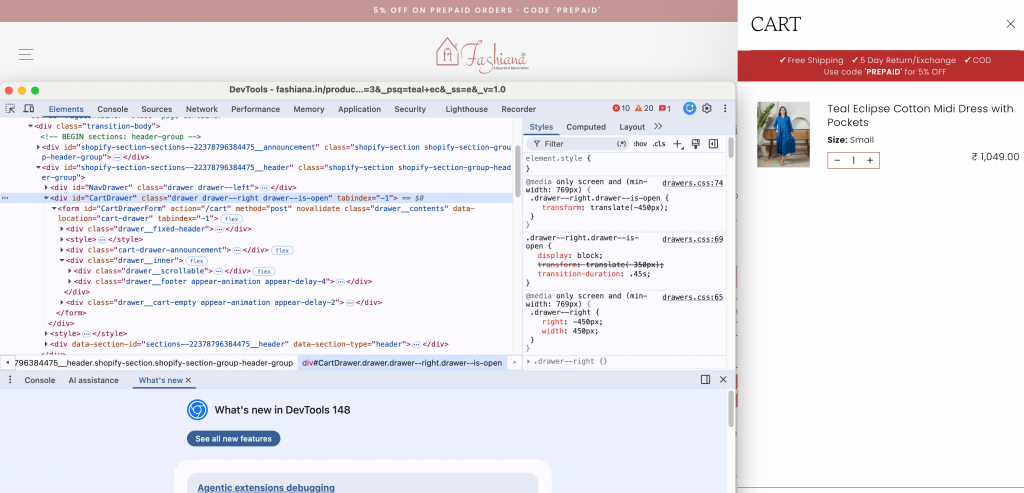
	// Replace '#CartDrawer' with the correct cart drawer selector from your theme, number 1 in the illustration
	const el = document.querySelector('#CartDrawer');
	const waDiv = document.getElementById('wa');

	if (el && waDiv) {
	    const observer = new MutationObserver(() => {
	        // Replace 'drawer--is-open' with the class added when the cart drawer is opened, number 2 in the illustration
	        if (el.classList.contains('drawer--is-open')) {
	            // Hide the WhatsApp floating widget when the cart drawer is open
	            window.sgWaGlobalFunctions.sgWaCloseFloatingWidget();

	        } else {
	            // Show the WhatsApp floating widget when the cart drawer is closed
	            window.sgWaGlobalFunctions.sgWaOpenFloatingWidget();
	        }
	    });
	    observer.observe(el, {
	        attributes: true,
	        attributeFilter: ['class']
	    });
	}
});
2. Or add the CSS below inside the` <head></head>` tags of the theme.liquid file.
{% style %}
#wa .wa__btn_popup,
#wa .wa__popup_chat_box {
  z-index: 30 !important;
}
{% endstyle %}