
Are you looking for the best ways to boost Shopify store growth with customer reviews? If you are, keep reading this post. Here, we will share 7 of the best tips to follow.
Customer reviews do more than fill a product page. On a Shopify store, social proof helps shoppers trust the item, complete checkout, and come back.
This complete guide covers 7 proven growth hacks for Shopify store growth, from how you automate review requests to how you show photo and video reviews on Shopify product pages.
You will see where review apps fit, how a small reward can support loyalty, and how to unlock repeat orders without a storewide sale. Treat reviews as part of the online store, not a plugin you turn on and forget.
First, let’s see why you should boost Shopify store growth with customer reviews.
Table of Contents
Why You Should Boost Shopify Store Growth with Customer Reviews
Reviews are key while a shopper is still deciding. Product images and product descriptions only show your version of the item. Customer reviews show the unboxing, the fit, and the pain points it actually solves.
That social proof sits on the product page, where the conversion rate is won or lost. A good product with detailed reviews and ratings builds trust before checkout. Shopify store owners can also read customer behavior from those notes and optimize product details accordingly.
That is practical conversion rate optimization, not a redesign. A review request via email, sent after the buyer has used the product, asks customers to leave reviews while the experience is fresh. A small discount can incentivize customers to share their feedback and drive repeat purchases.
Review apps can automate review requests and keep the widget seamless on mobile. You still approve what goes live. Reviews help you increase sales and unlock repeat customers without a storewide sale.
Why Reviews Move Shopify Sales
A shopper who makes a purchase on a Shopify store usually checks the product page twice: once for product information, once for proof. Customer reviews are that proof.
A short testimonial about fit or use can do more for the conversion rate than another line in the description. Reviews also show customer behavior. Shopify store owners can see what the target audience keeps asking, then run small tests on product pages.
That is optimizing your Shopify store based on customer data, not a guess. After the sale, the same reviews support repeat sales. Email marketing can ask customers to leave a review after they have used the item.
A Shopify review app can automate that request and keep the widget readable on mobile devices. The takeaway is direct. Reviews help you grow your Shopify store, increase average order value through clearer product pages, and give ecommerce businesses a reason to place the next order.
7 Best Ways to Boost Shopify Store Growth with Customer Reviews
| Way | What it grows | What you do |
|---|---|---|
| Ask after the product has been used | Real reviews, not rushed ratings | Send the request a few days after fulfillment |
| Collect photo and video reviews | Trust on the product page | Let buyers upload photos and short clips |
| Show reviews on the product page | Conversion, not just inbox opens | Put the widget where the buy decision happens |
| Moderate before publishing | A clean review section | Approve reviews before they go live |
| Reward useful reviews | Repeat orders | Give a next-order coupon for a review, photo, or video |
| Use review notes to fix product pages | Fewer pre-purchase questions | Update size, fit, and use details from what buyers write |
| Reuse review content | Ads, email, and collections | Pull strong quotes and customer photos into campaigns |
1. Ask After the Product Has Been Used, Not at Checkout
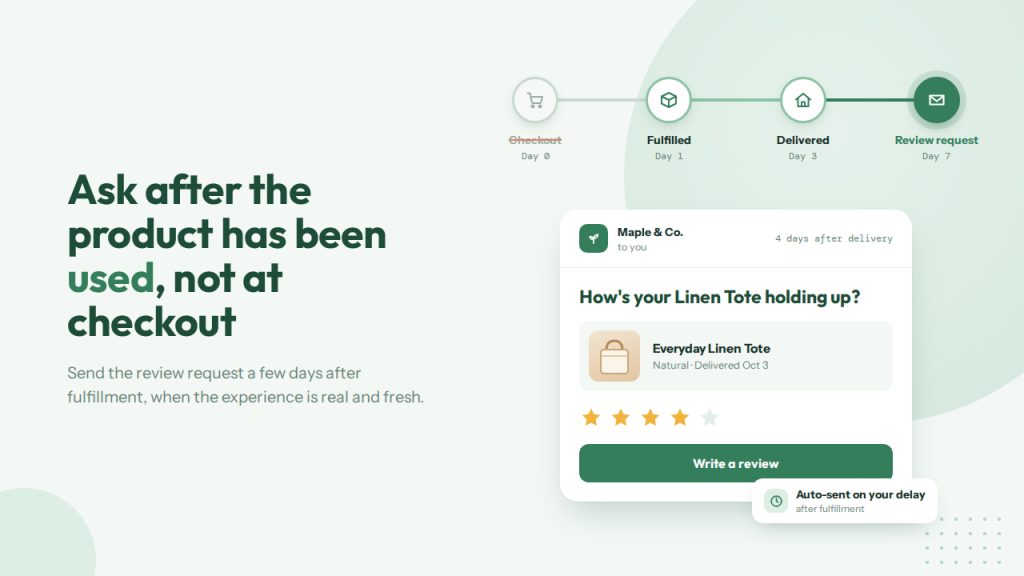
Ask for the review after the buyer has used the product, not while they are still in checkout. A request on the order confirmation page gets ignored, or it earns a rating from someone who has not opened the box.
That does little for the product page. Set the email for a few days after fulfillment. Clothing may need less time than skincare or a tool the buyer has to set up. The goal is a review written from use, not from the unboxing moment alone.
An app for Shopify can send that request on the delay you choose, with the product image and a direct review button. SeedGrow Product Reviews & Rewards does this after fulfillment, so you are not exporting orders by hand.
Customers participate when the ask is short and timed well. Those reviews then support the product page, where shoppers decide, and give you lines you can reuse later. That is a practical way to increase Shopify store trust without another sitewide sale.
2. Collect Photo and Video Reviews, Not Only Star Ratings
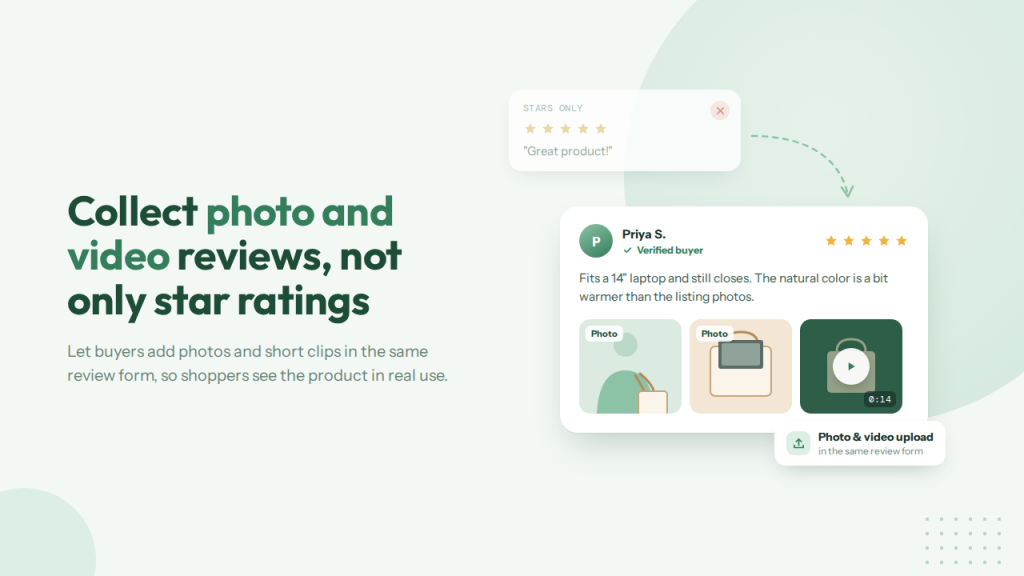
A star rating tells a shopper the product was fine. A photo or short video shows how it looks in real use. That is the difference between a number under the title and proof on the product page. Ask for media in the same review form, not in a second email.
A picture of the fit, color, or setup answers questions that your product photos cannot. Video helps more on items people need to see working, such as tools, skincare, or apparel. SeedGrow Product Reviews & Rewards lets buyers upload photos and videos with the review, and you can turn that option on in the widget settings.
Moderate the files before they go live so a blurry or unrelated upload does not sit on the page. A handful of clear customer photos will usually do more for trust than a long list of five-star ratings with no context.
3. Show Reviews on the Product Page, Not Only in an Email
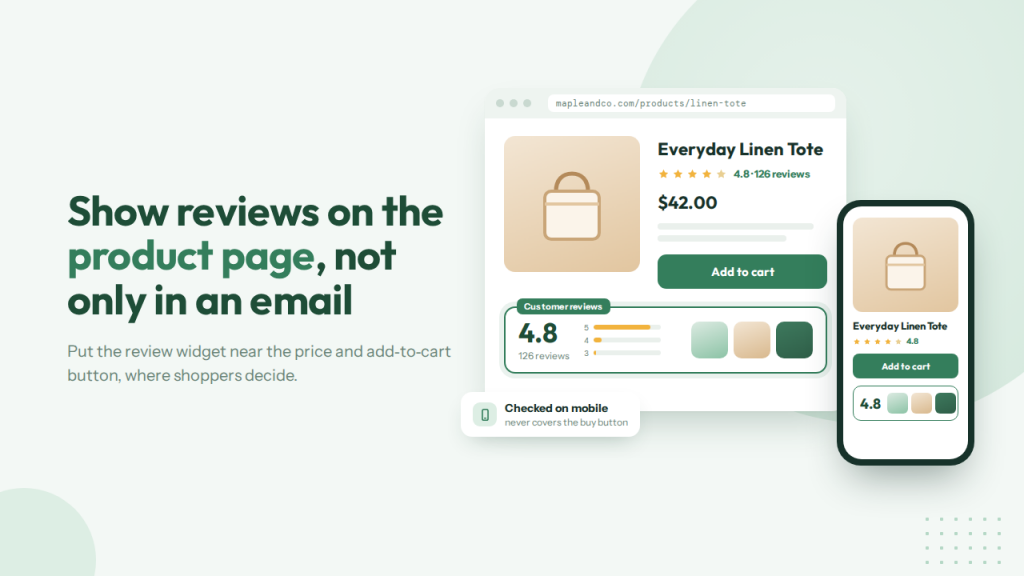
A review that only lives in an email helps the person who already bought. The shopper who is still deciding needs it on the product page, next to the price and the add-to-cart button. Put the widget below the product details or near the buy area, not in the footer where nobody scrolls.
Show the average rating, a few written reviews, and customer photos if you have them. Check the same page on a phone. A widget that covers the buy button hurts the page more than it helps. SeedGrow Product Reviews & Rewards adds a review widget you can match to the theme, with a summary and room for photos and videos.
Email can still ask for the review. The product page is where that review should do the selling.
4. Moderate Reviews Before They Go Live
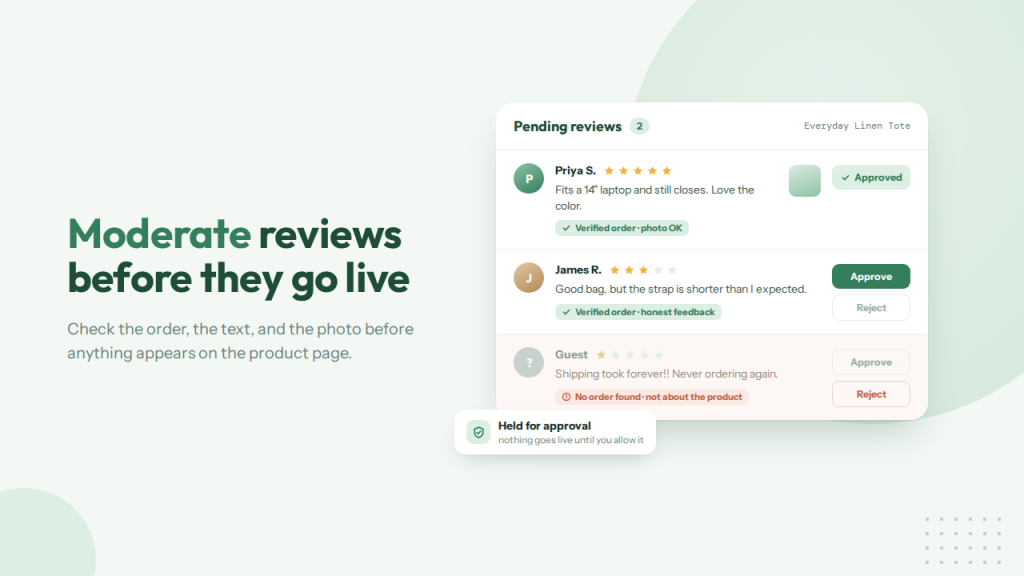
Not every review should go live the moment it is submitted. A fake order, a shipping complaint unrelated to the product, or a photo of the wrong item can sit on the product page and erode trust. Check the review before you publish it.
Confirm the buyer ordered the product, the text is about the item, and the photo or video is usable. You can still publish critical reviews. Shoppers trust a page more when it isn’t all five stars, as long as the note is genuine.
SeedGrow Product Reviews & Rewards holds reviews for approval, so nothing appears on the widget until you allow it. That extra step is short. It keeps the product page useful for the next shopper, rather than a dump of unfiltered submissions.
5. Reward Useful Reviews with a Next-Order Coupon
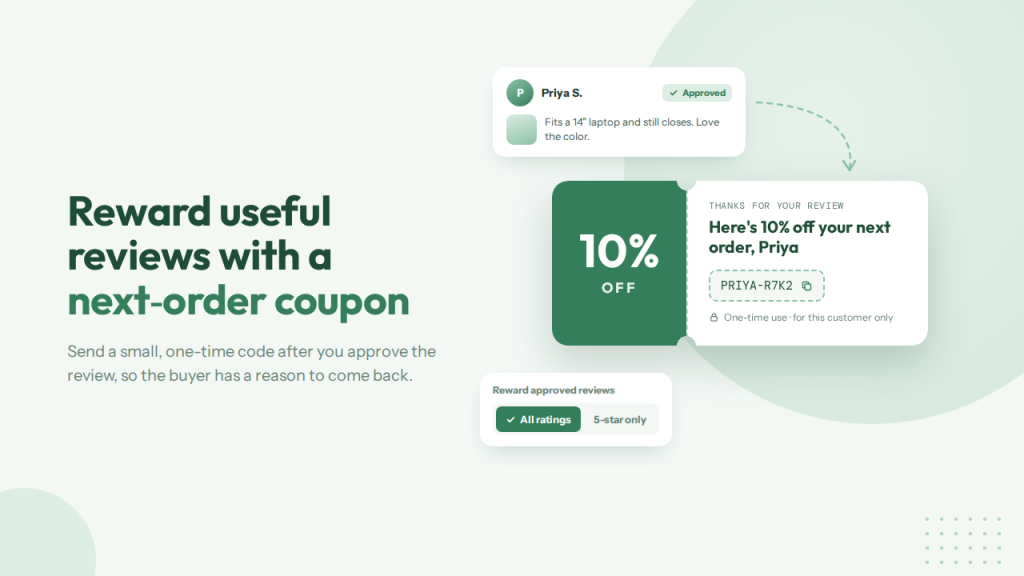
A next-order coupon gives the buyer a reason to review and come back. It should not be a public sitewide code. Tie it to the review, a photo, or a short video, and send it after you approve the submission.
Keep the amount small. A code that covers shipping or a modest percent off is enough for most stores. You can reward every approved review, or only five-star ratings, depending on how strict you want the offer to be. Either way, the code should be one-time use and intended for that customer.
SeedGrow Product Reviews & Rewards can automatically apply the discount to all ratings or only to five-star reviews. The review builds trust on the product page. The coupon is the follow-up that supports the next order.
6. Use Review Notes to Fix Product Pages
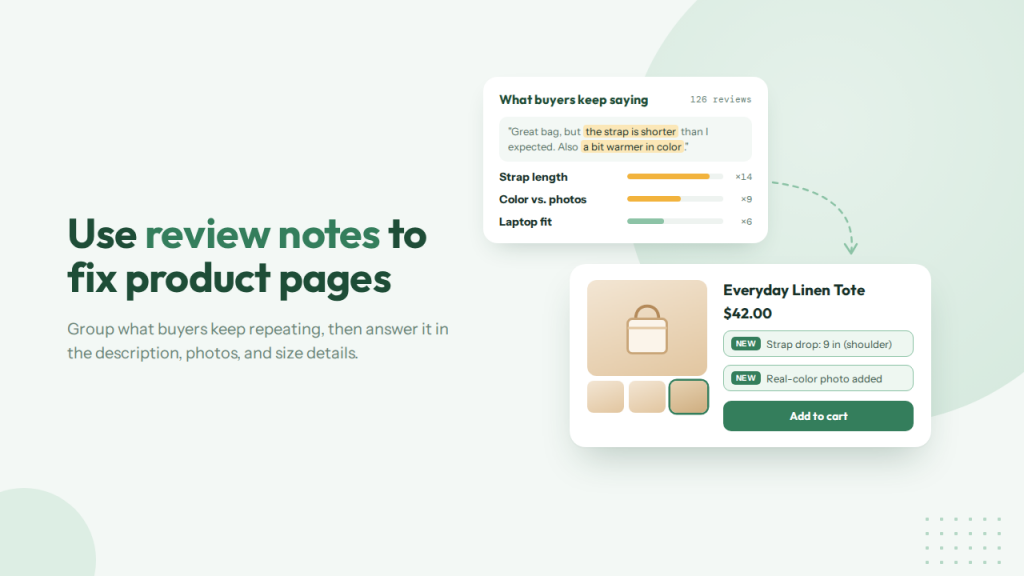
Reviews are not only social proof. They are a list of questions your product page failed to answer. If buyers keep writing about sizing, material, setup time, or what the item does not include, that note belongs in the description, not only under the stars.
Read a batch of reviews for one product and group the repeats. Update the size chart, add a photo of the real color, or put a one-line note near the add-to-cart button.
A page that already answers the common objection converts better than a page that hopes the review section will do it. SeedGrow Product Reviews & Rewards keeps those notes next to the product, so you can check them before you edit the page.
Fix the detail shoppers keep explaining. Then the next buyer does not have to learn it from a review.
7. Reuse Review Content in Ads, Email, and Collections
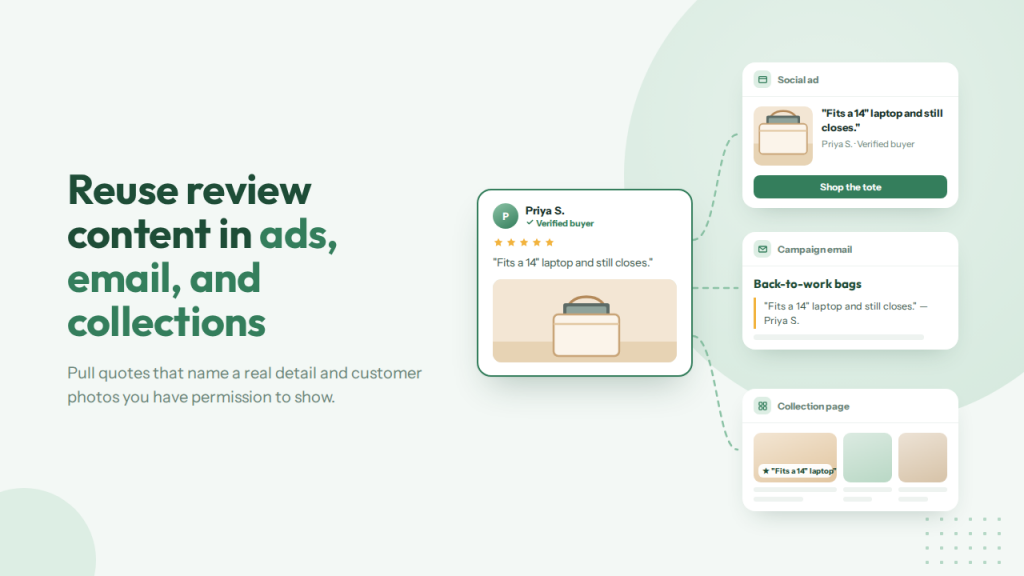
A strong review should not stay only under the product title. The same line, photo, or short clip can support the next place a shopper looks: an ad, a campaign email, or a collection page. Pull quotes that name a real detail.
Fit, setup, or how the item held up after a week are more useful than “love it.” Use customer photos in email and on collection pages when you have permission to show them. A review next to a related product can also help a shopper add a second item without a hard sell.
Keep the source clear. Do not rewrite a review into a claim the buyer did not make. SeedGrow Product Reviews & Rewards stores the text, photos, and videos in one place, so you are not hunting through old emails for a quote. Reuse the best ones.
Leave the rest on the product page.
Common Mistakes to Avoid While Collecting Customer Reviews on Shopify
Collecting customer reviews on a Shopify store fails when the ask is too early, the widget is hidden, or every rating goes live unchecked. These mistakes waste the social proof that should sit on Shopify product pages and help Shopify store growth.
- Asking within 24 hours of checkout: The buyer has not used the product yet. Wait until after fulfillment, then automate review requests. A rushed product review rarely helps the product page.
- Publishing every review with no moderation: One fake or off-topic review makes customers feel the page is untrustworthy. Approve reviews before they go live, even if the Shopify app makes setup easy.
- Collecting stars and skipping photos: A number alone is weak social proof. Photo and video reviews show the item in use and drive more conversions on the product page.
- Hiding reviews in email only: Reviews for Shopify only help the online store if shoppers see them before they buy. Put the widget on the product page, and check it on a phone.
- Rewarding every action at once: A discount for a review, a follow, a signup, and an email open blurs the offer. Tie the coupon to the review so loyalty stays simple.
- Ignoring what buyers write: Review analytics reveal your target audience and the gaps in your product details. Skipping that is a missed step in conversion rate optimization. SeedGrow Product Reviews & Rewards can handle the request, the widget, and the reward so the workflow is not a manual chase.
Get Started with Product Reviews & Rewards by SeedGrow
Frequently Asked Questions
Now, let’s take a look at some frequently asked questions and answers on this topic.
How do customer reviews affect the conversion rate on Shopify product pages?
A product review answers the questions a shopper still has after reading the description. Fit, use, and real photos sit next to the buy button, so the page feels safer. Social proof is one of the simpler ways to drive conversions on a Shopify store.
When should a Shopify store automate review requests?
Send the request after fulfillment, once the buyer has used the product. A same-day email is often ignored or receives a rushed rating. Review apps can automate review requests on a delay you set, so the follow-up does not depend on a manual list.
Which review apps are worth adding for Shopify store growth?
Look for a Shopify app that collects reviews, displays them on the product page, and lets you approve them first. Photo and video uploads matter more than a long feature list. SeedGrow Product Reviews & Rewards covers requests, a widget, moderation, and a reward in one place.
Should a discount be part of a review reward?
A small next-order discount can incentivize customers to leave their reviews without cutting the price of the item they just bought. Keep it tied to the review, photo, or video. A public storewide code trains people to wait. A private reward supports loyalty.
How do reviews help ecommerce businesses understand customer behavior?
Buyers write the pain points your product page missed. Size, material, and setup notes are customer data you can use. Understanding your target audience becomes easier when the same comment appears across orders.
Can reviews increase sales without a storewide promotion?
Yes. Clear reviews on Shopify product pages help a good product convert. They also give you lines for email and ads. The growth hack is proof on the page, not another sitewide sale.
How do you optimize Shopify product pages based on customer reviews?
Read what repeat customers keep explaining, then update product details, photos, and size notes. That is practical conversion rate optimization. Small tests on product pages often start with a sentence shoppers already wrote.
What are the takeaways for optimizing your Shopify store with reviews?
Ask after use, show reviews on the product page, moderate before publish, and reward useful feedback. Automation handles the request. You still decide what goes live. Those steps are enough to improve customer trust without a redesign.
How can reviews unlock repeat customers?
A coupon after a review gives the buyer a reason to return. It works better than a loyalty program that nobody joins. The code should be one-time use for that customer on a later order.
Do Shopify apps need to cover mobile responsiveness for reviews?
Yes. Most shoppers buy in a browser on a phone. A widget that covers the buy button hurts the page. Ensuring mobile responsiveness is part of setup, not a later fix. Check the product page on your phone before you turn on the automation.
Conclusion
Customer reviews only grow a Shopify store when they show up where the shopper decides. Ask after the product has been used, collect photos and videos, and put reviews and testimonials on the product page.
Moderate what goes live. Use the notes to optimize product details, then reuse strong quotes in email. A small discount can bring customers back without a storewide sale. That is loyalty, not a race to the lowest price.
Review apps can automate review requests so you are not chasing every order by hand. SeedGrow Product Reviews & Rewards is built for that flow: requests after fulfillment, photo and video reviews, approval before publish, and a coupon for the review.
The takeaway is simple. Treat reviews as part of the online store. Do that, and social proof can increase sales and unlock repeat customers.
Do you know any other methods to boost your product sales?
Let us know in the comments.
