
Do you want to learn more about antispam protection in order withdrawals? In this post, we are going to show you show you everything you need to know about it.
Handling withdrawal requests is essential for Shopify stores, but it also opens the door to spam, bot attacks, and fake submissions that can disrupt your workflow. Without proper protection, these issues can waste time, compromise data accuracy, and affect the customer experience.
This is where antispam protection becomes critical. By using techniques like honeypots, timing checks, rate limiting, and progressive cooldowns, you can secure your process without adding friction.
In this guide, you will learn how to protect your store and manage withdrawal requests efficiently using a reliable solution.
Table of Contents
What Is Antispam Protection in Order Withdrawals
Antispam protection in order withdrawals refers to the set of techniques used to prevent fake, automated, or abusive withdrawal requests from reaching your Shopify store.
It ensures that only genuine customer requests are processed, keeping your workflow accurate and efficient. In a typical setup, withdrawal requests are submitted through forms or buttons on your store.
Without protection, these entry points can be targeted by bots or malicious users, leading to spam submissions, duplicated requests, or invalid data. Antispam systems work by analyzing behavior and filtering suspicious activity before it enters your system.
This includes detecting unnatural submission patterns, blocking repeated attempts, and silently trapping bots without affecting real users. For Shopify merchants, this is not just a security layer; it is a critical part of maintaining a clean, reliable, and scalable withdrawal process.
Why Antispam Protection Matters for Shopify Merchants
Antispam protection is essential for Shopify merchants who handle order withdrawal requests, especially as store traffic and order volume increase.
Without it, your withdrawal system can quickly become vulnerable to spam, fake submissions, and automated bot attacks. The biggest impact is wasted time. Fake requests force you to review and filter invalid data manually, slowing down your workflow.
Over time, this can significantly increase support workload and reduce efficiency.
It also affects data accuracy. Spam submissions can clutter your system, making it harder to track genuine customer requests and respond correctly. From a security standpoint, repeated or automated attacks can disrupt your backend processes and expose weaknesses in your store setup.
By implementing antispam protection, you ensure that only valid withdrawal requests are processed, keeping your operations clean, efficient, and reliable while maintaining a smooth experience for real customers.
Common Types of Spam in Withdrawal Requests
Understanding the types of spam that target withdrawal requests helps you choose the right protection strategy. Shopify stores often face multiple forms of abuse, ranging from simple bots to repeated manual submissions.
| Spam Type | Description | Impact on Your Store |
|---|---|---|
| Bot Submissions | Automated scripts that submit withdrawal forms at high speed | Floods your system with fake requests and increases server load |
| Fake Customer Requests | Submissions with invalid or random names, emails, or order details | Wastes time and reduces data accuracy |
| Repeated Submissions | The same user or script is sending multiple requests in a short time | Disrupts workflow and creates duplicate entries |
| Malicious Abuse | Intentional attempts to exploit your system or test vulnerabilities | Creates security risks and potential system instability |
Each of these spam types can affect your ability to manage genuine withdrawal requests efficiently. Without proper filtering, your team may spend more time handling noise than actual customer needs, making antispam protection a critical part of your Shopify setup.
Deep Dive: How These Antispam Methods Work
Effective antispam protection is not based on a single filter. It relies on layered mechanisms that analyze behavior, intent, and request patterns in real time. Below is a more technical breakdown of the key methods used to secure Shopify withdrawal workflows.
Honeypots
Honeypots are invisible form fields added to your withdrawal request form. These fields are hidden from real users using CSS or JavaScript, so they remain untouched during normal interaction. However, bots typically scan and fill every available input field in the DOM.
When a hidden field is filled, the system immediately flags the submission as automated and discards it. This method is highly effective because it works silently in the background. It introduces zero friction, does not interrupt user flow, and requires no additional action from customers.
It is often the first line of defense against basic bots.
Timing Checks
Timing checks evaluate the time interval between when a form is loaded and when it is submitted. Human users naturally take time to read, understand, and fill out a withdrawal form. In contrast, bots can submit forms in milliseconds.
By setting a realistic threshold, for example, rejecting submissions that occur too quickly, the system can filter out non-human behavior. More advanced implementations also analyze interaction patterns, such as typing delays and field focus changes, to further improve accuracy.
Rate Limiting
Rate limiting restricts how many withdrawal requests can be submitted within a defined time window from a single source, such as an IP address or user session. For example, a store might allow only 3 requests per minute per user.
If the threshold is exceeded, additional requests are temporarily blocked or delayed. This prevents spam bursts, reduces server load, and protects your system from being overwhelmed by automated attacks or repeated submissions.
Progressive Cooldowns
Progressive cooldowns build on rate limiting by dynamically increasing restrictions after repeated violations. Instead of applying a fixed limit, the system escalates response severity based on user behavior.
For instance, the first few extra attempts might trigger a short delay, while continued abuse results in longer waiting periods or temporary blocks. This adaptive approach is highly effective against persistent attackers because it gradually makes spamming inefficient and time-consuming.
Why Layered Protection Matters
Each method targets a different type of spam behavior. Honeypots catch basic bots, timing checks detect unnatural speed, rate limiting controls volume, and progressive cooldowns stop persistent abuse.
When combined, they create a robust, multi-layer defense system that protects your Shopify withdrawal process without disrupting legitimate users. This is the kind of structured protection that modern Shopify stores need to maintain both security and performance.
Manual vs Automated Protection
When it comes to handling spam in withdrawal requests, Shopify merchants typically rely on either manual review or automated antispam systems. The difference between the two has a direct impact on efficiency, accuracy, and scalability.
| Approach | How It Works | Advantages | Limitations |
|---|---|---|---|
| Manual Protection | Reviewing each withdrawal request individually and filtering spam by hand | Full control over decisions, flexible handling of edge cases | Time-consuming, not scalable, high risk of human error, and delayed responses |
| Automated Protection | Using systems that detect and block spam based on behavior and patterns | Fast, consistent, scalable, reduces workload, improves accuracy | Requires initial setup, depends on proper configuration |
Manual protection may work for very small stores with low request volume, but it quickly becomes inefficient as traffic grows. Reviewing every request slows down response times and increases the chances of missing or misclassifying submissions.
Automated protection, on the other hand, handles spam filtering in real time. It uses techniques like honeypots, timing checks, rate limiting, and progressive cooldowns to detect suspicious behavior instantly.
This ensures that only valid withdrawal requests reach your system, keeping your workflow clean and efficient. For most Shopify merchants, automation is not just a convenience; it is a necessity for maintaining a secure and scalable withdrawal process.
How to Add Antispam Protection to Shopify Withdrawal Requests
You need to install SeedGrow’s Winderruf Button app on your store. Once you have activated it, you can see it’s settings on the left-hand menu.
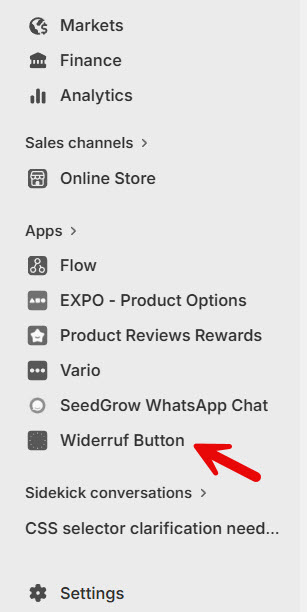
Open the settings to configure it.
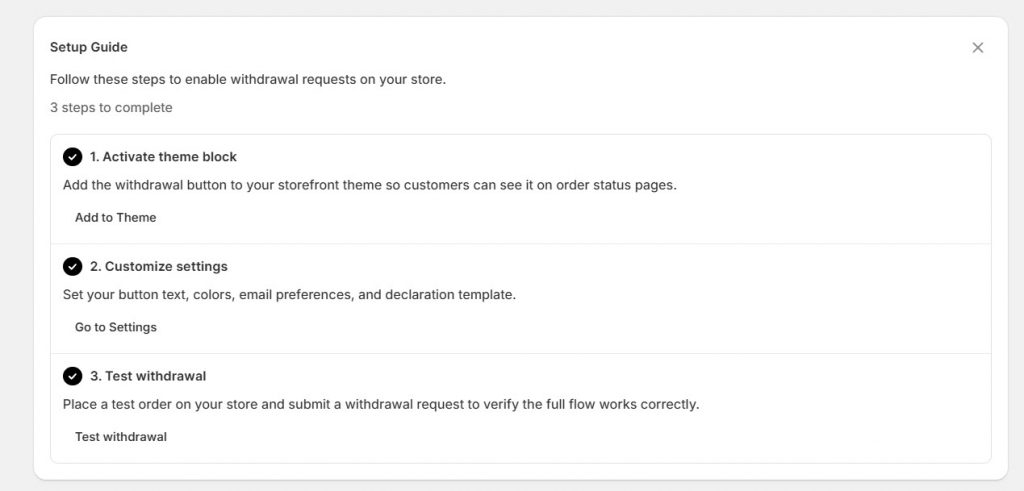
Next, go to the settings and scroll down until the security section.
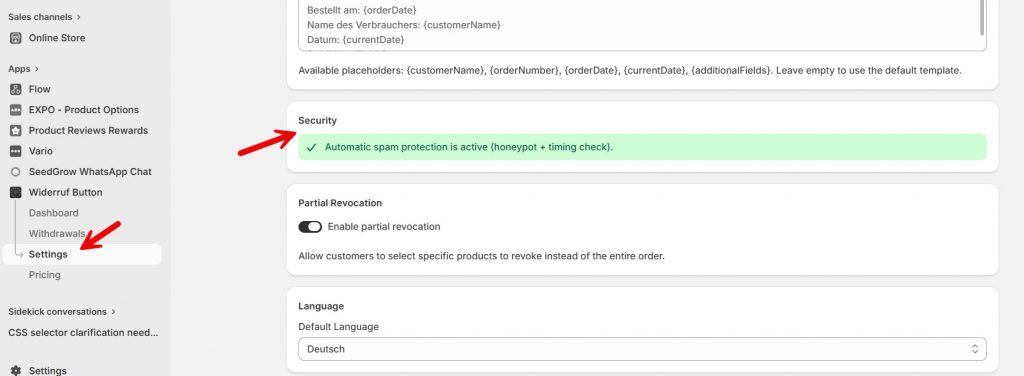
As you can see, the app will automatically add spam protection to the website. As of now, we have a honeypot and timing-check protection. You do not need to make any further customizations; this is all you need. Your form will be protected from now on.
That’s it!
As you can see, this is the simplest way to add anti-spam protection to your order withdrawals.
Best Practices for Secure Withdrawal Handling
To keep your Shopify withdrawal process secure and efficient, it is important to combine strong antispam protection with a well-structured workflow. The goal is to block abuse while maintaining a smooth experience for real customers.
| Best Practice | What It Means | Why It Matters |
|---|---|---|
| Use a Structured Withdrawal System | Avoid basic contact forms and use a dedicated withdrawal mechanism | Reduces vulnerabilities and keeps requests organized |
| Apply Layered Antispam Protection | Combine honeypots, timing checks, rate limiting, and progressive cooldowns | Improves detection accuracy and blocks different types of spam |
| Keep Forms Minimal and Validated | Ask only for essential information and validate inputs | Reduces attack surface and improves data quality |
| Ensure High Visibility | Make the withdrawal option easy to find in your store | Improves compliance and user trust |
| Monitor Request Patterns | Track unusual spikes or repeated attempts | Helps identify and respond to suspicious behavior early |
| Avoid Overloading Users with Friction | Do not rely only on CAPTCHAs or complex steps | Maintains a smooth user experience |
| Automate Where Possible | Use tools to handle filtering and confirmations automatically | Saves time and ensures consistency |
Implementing these best practices creates a secure and scalable withdrawal system that can handle growth without increasing manual workload.
Solutions like the SeedGrow Widerruf Button app simplify this process by combining structured request handling with built-in antispam protection, allowing you to apply these practices without complex setup.
Frequently Asked Questions
Now, let’s take a look at some frequently asked questions and answers about this topic.
What is antispam protection in Shopify withdrawal requests?
Antispam protection is a system that filters out fake, automated, or abusive withdrawal requests before they reach your workflow. It ensures only genuine customer submissions are processed. Using a solution like the SeedGrow Widerruf Button app adds built-in protection, helping you manage requests securely without manual filtering.
Why do Shopify withdrawal forms attract spam?
Withdrawal forms are public entry points, which makes them easy targets for bots and malicious users. Without protection, automated scripts can submit large volumes of fake requests. SeedGrow helps prevent this by using layered antispam techniques that block suspicious activity in real time.
How can I prevent spam in withdrawal requests on Shopify?
You can prevent spam by implementing techniques like honeypots, timing checks, rate limiting, and progressive cooldowns. Instead of setting these up manually, the SeedGrow Widerruf Button app provides a ready-to-use system that handles everything automatically.
What is a honeypot, and how does it stop spam?
A honeypot is a hidden field in a form that real users cannot see. Bots often fill it out, which allows the system to identify and block them instantly.
How do timing checks improve spam detection?
Timing checks analyze how quickly a form is submitted. Requests submitted too fast are likely from bots. This method helps filter non-human behavior without affecting real users.
What is rate limiting in Shopify forms?
Rate limiting restricts how many requests can be submitted within a specific time period. It prevents spam bursts and reduces server load.
What are progressive cooldowns and why are they important?
Progressive cooldowns increase restrictions after repeated attempts. If a user keeps submitting requests, the system gradually adds delays. This makes persistent spam ineffective. People use this approach to strengthen protection while keeping the experience smooth for genuine customers.
Is manual spam filtering enough for Shopify stores?
Manual filtering may work for small stores, but it becomes inefficient as request volume increases. It is slow, error-prone, and hard to scale. Automated solutions like SeedGrow handle spam in real time, ensuring faster and more reliable request management.
Will antispam protection affect real customers?
Well-implemented antispam systems are designed to be invisible to real users. Techniques such as honeypots and timing checks operate in the background without adding friction. SeedGrow focuses on maintaining a smooth user experience while blocking unwanted activity.
How does SeedGrow improve withdrawal request security on Shopify?
SeedGrow combines structured request handling with advanced antispam protection. It filters out spam, organizes valid submissions, and automates the workflow. This allows Shopify merchants to save time, stay secure, and manage withdrawal requests efficiently without the need for technical complexity.
Conclusion
Antispam protection is no longer optional for Shopify merchants handling withdrawal requests. As spam and automated abuse continue to grow, relying on manual filtering or basic forms can quickly lead to inefficiencies, missed requests, and poor customer experience.
By implementing layered techniques like honeypots, timing checks, rate limiting, and progressive cooldowns, you can protect your store while keeping the process smooth for real users. With the SeedGrow Widerruf Button app, all of this is handled for you.
It combines structured request management with built-in antispam protection, allowing you to secure your workflow, reduce manual effort, and manage withdrawal requests with confidence.
How else would you protect your website from spam?
Let us know in the comments.
