
Do you want to automate order withdrawal confirmations? If you are looking for a simple tutorial, keep reading. In this blog post, we will show you how to simply automate order withdrawal confirmations in seconds.
Manually handling withdrawal confirmations can slow your Shopify operations and delay customer communication.
As order volume increases, responding to every request becomes inefficient and harder to manage consistently. Automating order withdrawal confirmations allows you to instantly acknowledge requests, improve response time, and maintain a professional workflow.
In this guide, you will learn how to automate withdrawal confirmations in seconds and simplify the entire process using a practical solution built for Shopify merchants.
First, let’s see what order withdrawal confirmations are and why they are important.
Table of Contents
What Are Order Withdrawal Confirmations
Order withdrawal confirmations are messages sent to customers after they submit a request to cancel or withdraw from a purchase. These confirmations acknowledge receipt of the request and inform the customer of the next steps in the process.
They play an important role in maintaining transparency and meeting customer expectations, especially for stores operating under regulations like the 14-day withdrawal right.
A clear confirmation reassures customers that their request is being handled and reduces uncertainty. For Shopify merchants, a consistent, timely confirmation process is essential.
Automating these confirmations ensures every request is acknowledged instantly while keeping communication structured and reliable.
How to Automate Order Withdrawal Confirmations
We are going to use the SeedGrow Widerruf Button app to complete this process. You can see it inside the Shopify app store and install it on your own store.
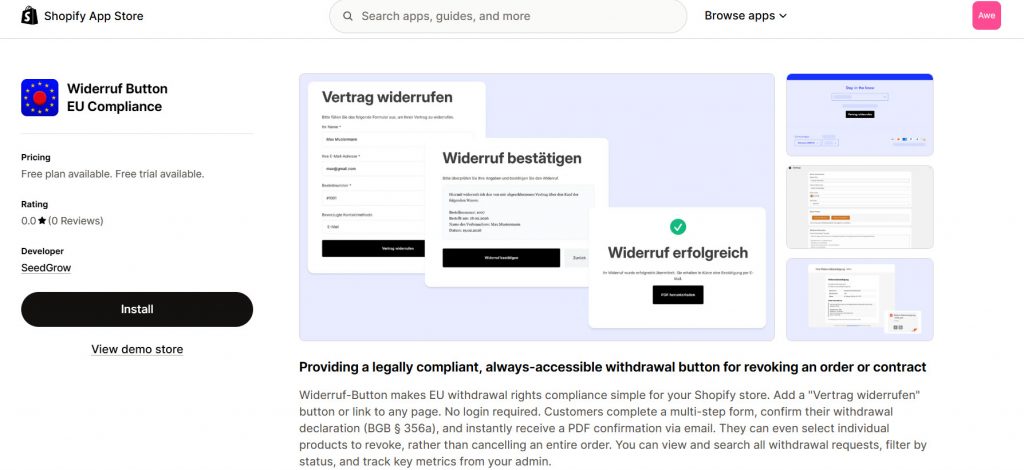
Once you have installed this app on your store, we can start with the customization. To automate the order withdrawals, you can
- Add a withdrawal button on the website so your customers can easily access it
- Automate the PDF generation with all the necessary data
- Email the customers instantly, so there is no wait
- Manage all withdrawals from the backend
SeedGrow’s Winderruf Button app checks all boxes. Let’s see how to use it to automate the task. Once you have activated the app on your store, you can see it’s settings on the left-hand side.
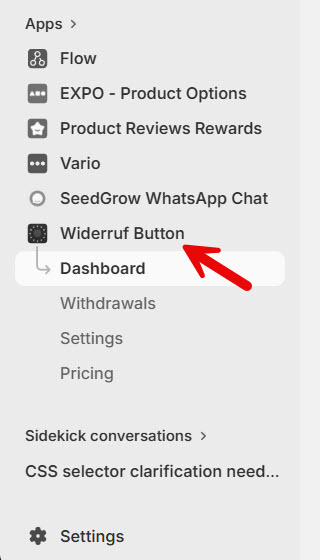
Let’s start with the customization.
1. Enable a Withdrawal Button
First, you have to add the withdrawal button to the site. The app makes it easy. In the app settings, you will see an option to add the withdrawal block to the theme.
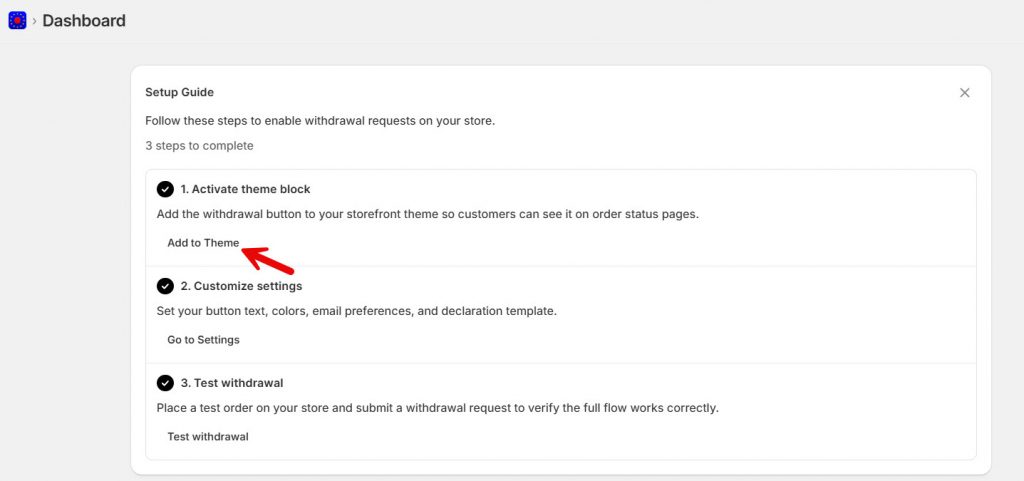
In a new tab, the theme editor will open. And you can customize the placement of the withdrawal button from the left-hand side. You can move it around using the drag and drop feature.
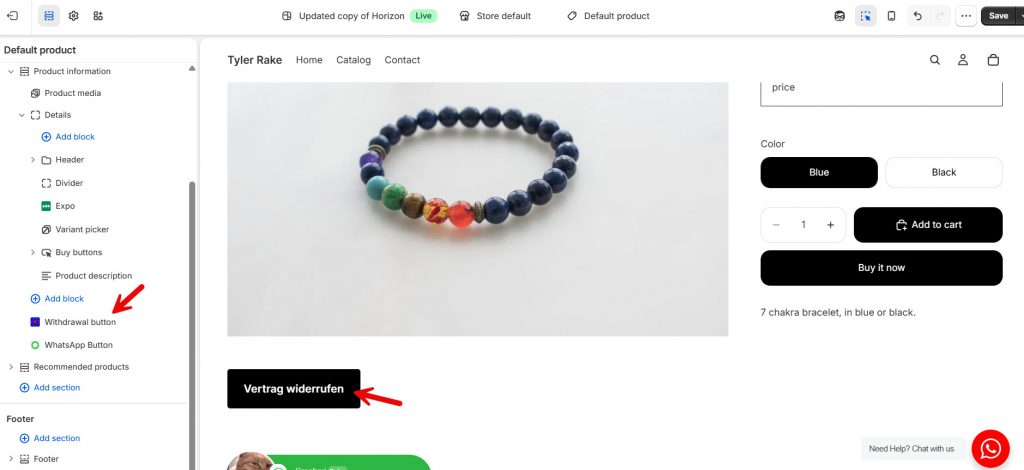
And you can further customize the button, too. When you double-click the button block, it will show you the additional customization options.
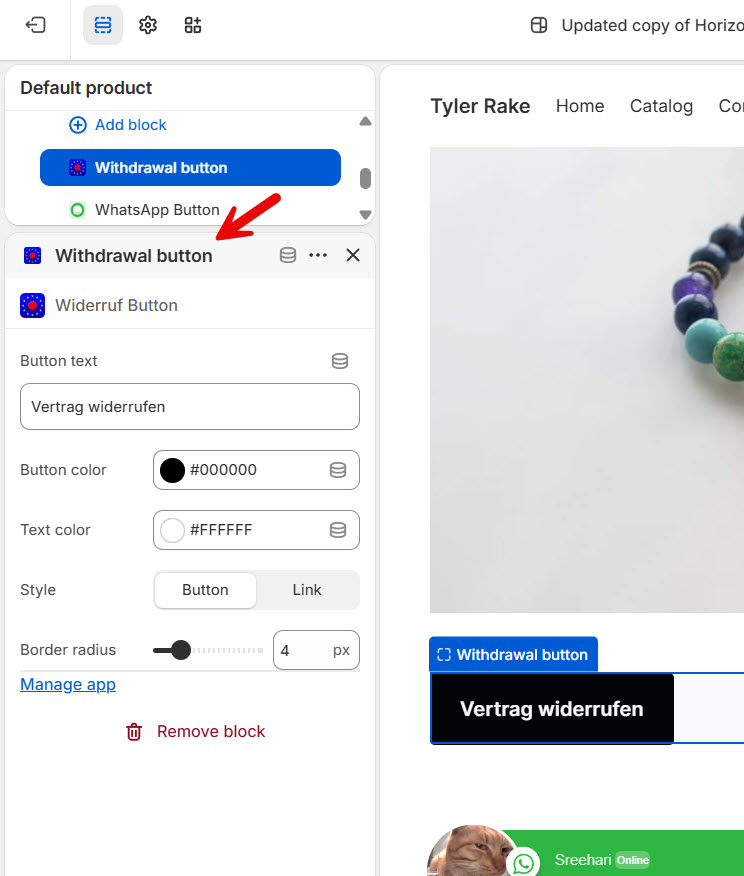
You can tweak the
- Button text
- Button color
- Text color
- Style
- Border radius
And so on.
All the changes will be reflected on the front end almost instantly. Once you are done with the button customization, save the changes, and that’s it!
Now, to customize the form, you can open the app settings and tweak the form options.
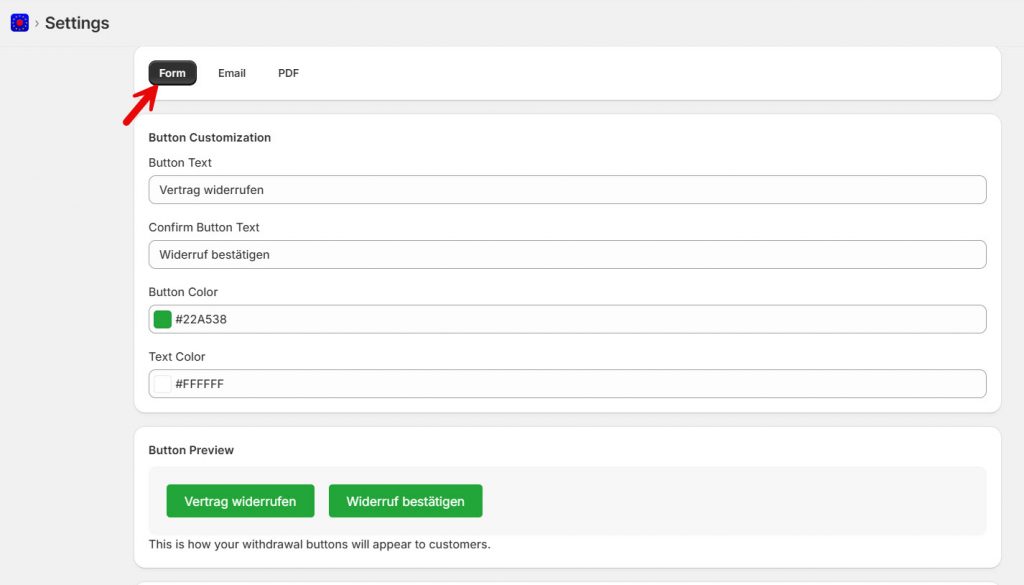
2. Automate PDF Generation
Now go to the PDF settings and you will see multiple options there.
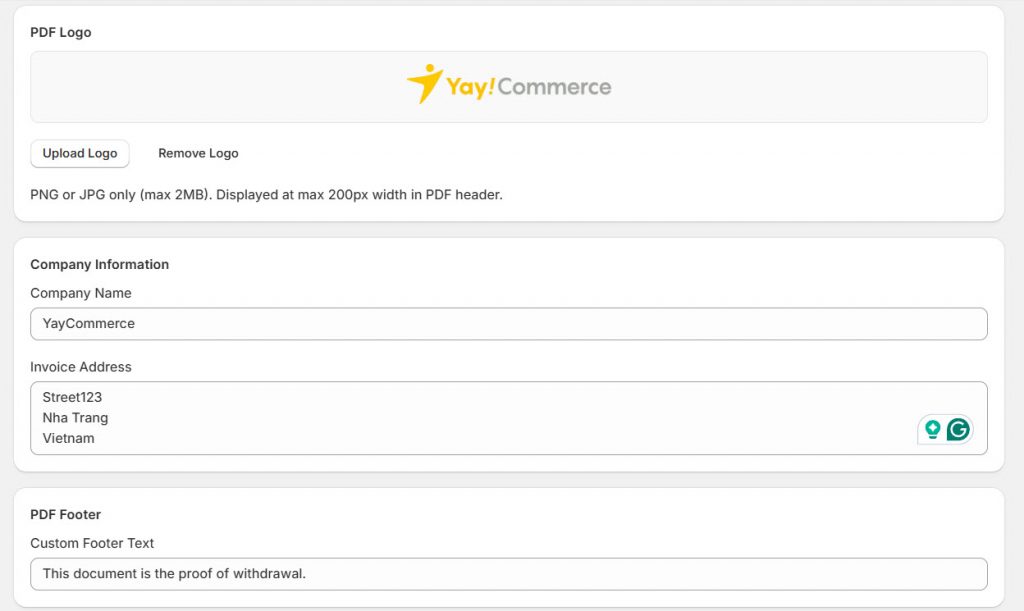
You will see
- Logo
- Company name
- Invoice address
- PDF footer
Tweak those according to your preferences and save them. The app will also show you a live preview of the PDF the customer will receive.
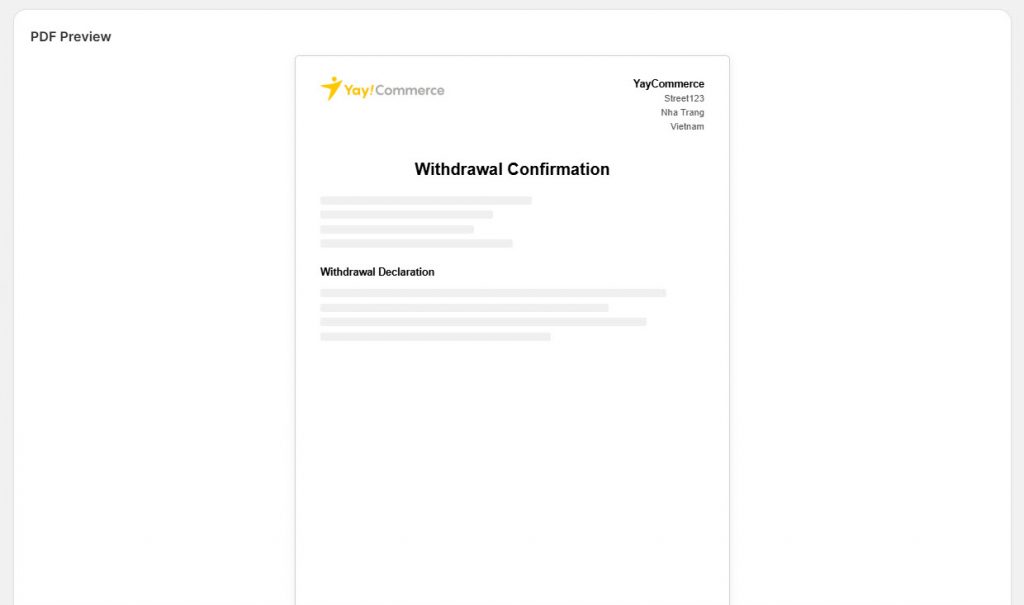
So you will know what it will look like. The PDF template will be sent to the customers who request a withdrawal.
3. Trigger Instant Email Notifications
Now we have email configuration. There are some configuration options you need to do.
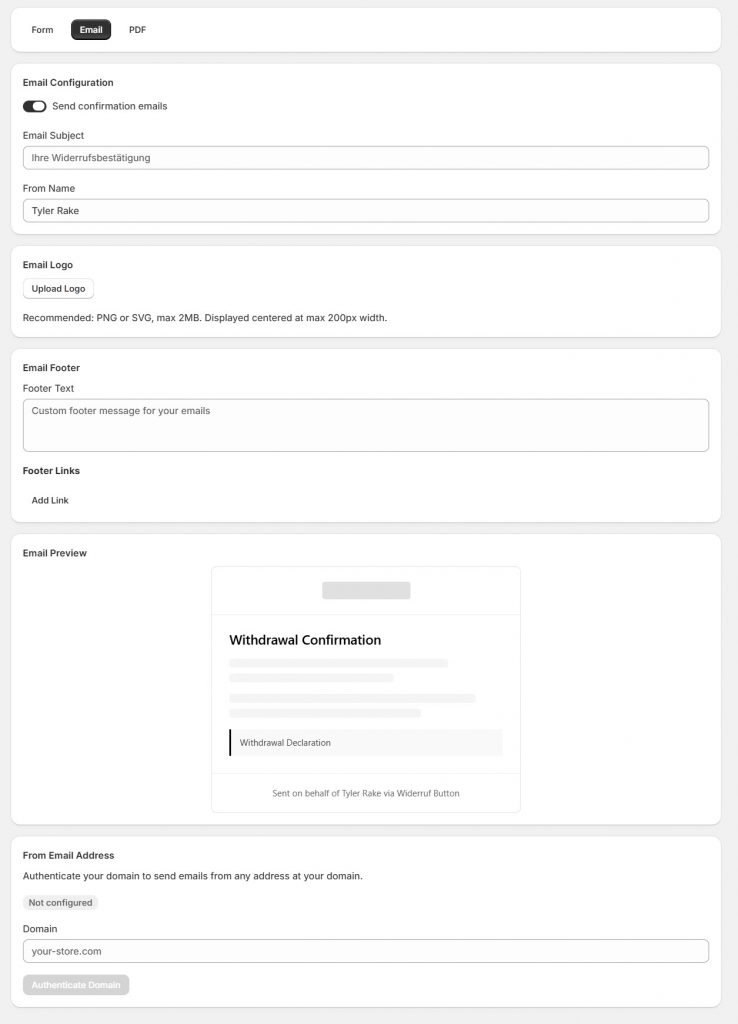
You have to add
- Email subject
- From name
- Logo
- Email footer
- Footer links
- From email address
Once you have added everything, the live preview will show you how your email will look.
4. Manage Everything from the Dashboard
If you go to the withdrawals section, you can see all the withdrawals your customers made.
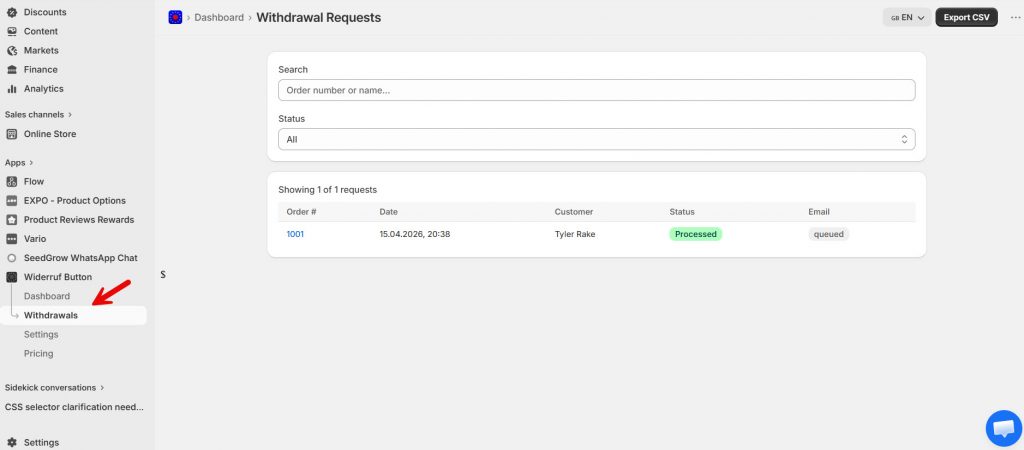
You can individually manage them from there. On top of that, you can export the withdrawal data. You can export them as a CSV file to store them offline.
That’s it!
This is how you can automate order withdrawal confirmations in Shopify.
What Are the Pros of Automating the Order Withdrawals
Automating order withdrawals helps Shopify merchants handle requests faster, more accurately, and with less manual effort.
- Instant confirmations: Customers receive immediate acknowledgment after submitting a withdrawal request. This reduces uncertainty and improves trust.
- Time savings: Automation removes the need to respond to every request manually, freeing up time for more important tasks.
- Consistent communication: Every customer receives a clear, standardized confirmation message, ensuring a professional experience across your store.
- Better organization: All withdrawal requests are collected and managed in a structured system, making it easier to track and respond without missing anything.
- Improved compliance: Timely confirmations and a clear process help you stay aligned with withdrawal regulations, especially for EU customers.
With the SeedGrow Widerruf Button app, you can unlock all these benefits with a simple setup, no coding required.
Frequently Asked Questions
Now, let’s take a look at some frequently asked questions and answers about this topic.
How do I automate order withdrawal confirmations in Shopify?
You can automate order withdrawal confirmations by using a dedicated Shopify app that handles withdrawal requests and triggers instant responses. The SeedGrow Widerruf Button app provides a complete solution, allowing you to automatically send confirmation messages as soon as a customer submits a withdrawal request.
Why should I automate withdrawal confirmations instead of handling them manually?
Manual confirmations are slow and inconsistent, especially as your store grows. Automation ensures every customer receives an instant response, improves accuracy, and reduces your support workload. With SeedGrow, the entire process runs in the background without requiring constant attention.
Can I customize automated withdrawal confirmation messages?
Yes, customization is important for maintaining brand consistency. The SeedGrow Widerruf Button app lets you tailor confirmation messages to your store’s tone, include order details, and clearly explain the next steps for customers.
Does automating withdrawal confirmations help with legal compliance?
Yes, timely confirmation of withdrawal requests is part of maintaining a transparent and compliant process. Automating confirmations helps ensure that no request is missed and that every customer receives proper acknowledgment, which is critical for stores serving EU customers.
Will automation affect my customer experience?
Automation improves customer experience by providing immediate feedback. Customers do not have to wait for manual replies, which builds trust and reduces uncertainty. With SeedGrow, confirmations are clear, consistent, and delivered instantly.
Is it difficult to set up automated withdrawal confirmations?
No, the setup is simple and does not require coding. The SeedGrow Widerruf Button app is designed for quick installation and configuration, allowing you to automate confirmations in just a few steps directly from your Shopify dashboard.
How does SeedGrow simplify withdrawal request management?
SeedGrow not only automates confirmations but also organizes all withdrawal requests in a structured system. This makes it easier to track, manage, and respond to requests efficiently while ensuring your Shopify store remains compliant and well-organized.
Conclusion
Automating order withdrawal confirmations is a simple but powerful way to improve efficiency, maintain compliance, and deliver a better customer experience. Instead of manually responding to every request, you can ensure instant, consistent communication while reducing your support workload.
With the SeedGrow Widerruf Button app, you can automate the entire process without any technical complexity.
From collecting withdrawal requests to sending confirmations, everything is handled in a structured and reliable way. This allows you to save time, stay organized, and run your Shopify store more efficiently as it grows.
How else would you optimize your Shopify store?
Let us know in the comments.
